Monday, 4 March 2019

5 Best Cashback Apps for Android in India 2019

5 Best Cashback Apps for Android in India 2019

E-banking has undoubtedly become an imperative part of our daily digital life. E-banking apps facilitate us to complete our day to day payments and transactions within a few seconds which makes our life a lot easier. As a result, Banking apps and E-wallets have been broadly accepted around the world due to their ease of access and security. Today, there isn’t even a need to carry hard cash in your pocket whenever you go out for shopping.

Coming to the present scenario, banking and E-wallet apps are not only used for making payments and transactions but also for a wide range of services offered, such as mobile recharges, movie ticket bookings, utility bill payments, online and offline payments and a lot more.

Along with their services, these apps also provide its users with a lot of other benefits in the form of offers, discount coupons, cash-back etc. This helps users to save a part of their money whenever they make a successful transaction using these apps. Thus, people are highly obsessed to know about different banking apps with such paybacks.

So let us take a look at some of the best cashback apps for Android available in India.

Worth Reading: 5 Best Electricity Bill Payment Apps in India
Best Cashback Apps for Android in India:


PayTM


MagicPin


CouponDuniya


Freecharge


MobiKwik
1. PayTM

PayTM is one of the most successful and renowned digital wallets and E-Commerce payment system with more than 300 million users.

PayTM provides a wide range of services including mobile recharges, bill payments, UPI money transfer, shopping, loan payments, travel and movie ticket bookings and much more.

PayTM gives you a lot of cashbacks whenever you make a successful payment through it. Cashbacks can be claimed using promo codes, the user can use his/her cashback amount to do mobile recharges or any other services provided by PayTM.


Main Features:


Mobile Recharge & Bill Payment.


Money Transfer.


Water, Gas & Electricity Bill Payment.


Entertainment: Movie Tickets, Amusement Parks & Events.

Download PayTM
2. MagicPin

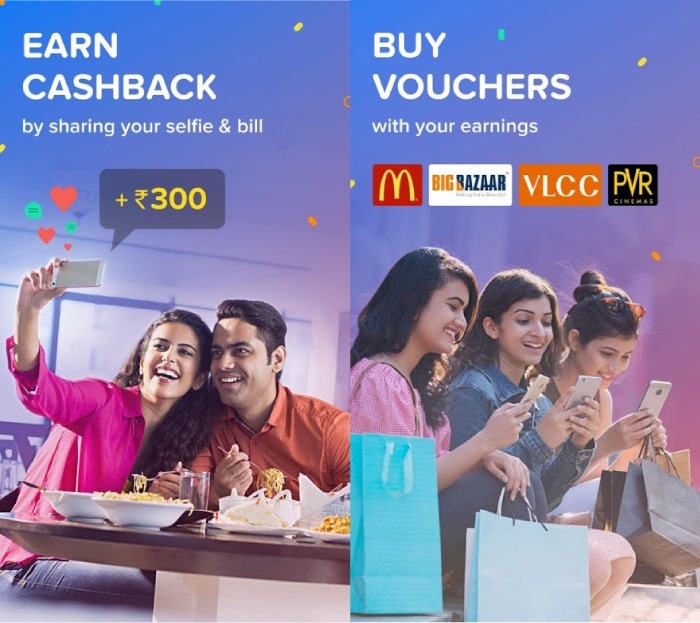
Voted as the best cashback app of 2018, MagicPin is an amazing cashback app as well as a social network which let you find best offers, vouchers, and deals on food, fashion, travel etc near you. The app has a wide range of stores listed in it.

Once you have signed up in MagicPin app, you can start searching for offers available nearby stores, restaurants, hotels, salons etc. You can easily earn MagicPin points which can give cashbacks up to 100% by sharing a selfie of you with your bill from the store which you have visited.

You can redeem your MagicPin points to do recharges, book tickets etc and even to pay bills in a listed offline outlet as well.

Main Features:


Exclusive coupons, gift vouchers, deals, and offers.


Movies and Events vouchers.


Fashion vouchers.


Beauty vouchers.

Download MagicPin
3. CouponDuniya

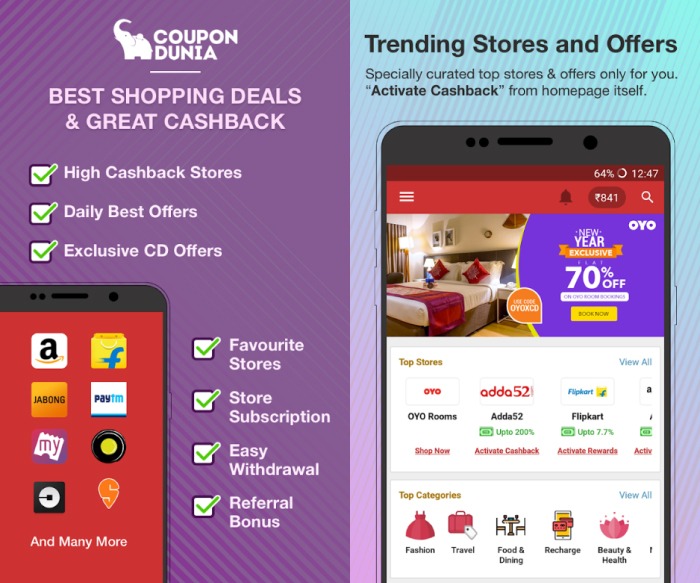
Couponduniya is one of the biggest coupon websites in India with over 9 million active monthly users.

The app helps you find live amazing deals on food, fashion, travel etc near you from the stores listed in it. For every transaction you made using CouponDunia, you will be getting an assured amount as cashback.

You can keep money in the form of cashbacks, coupons, offers, and other discounts and this can be either used for mobile recharges or else you can transfer the amount to your wallet as well.

Main Features:


Browse Best Coupons and Offers.


Real-Time Notifications.


Browse Offers with Discount Filter.


Browse Store-specific Offers.

DownloadCouponduniya
4. Freecharge

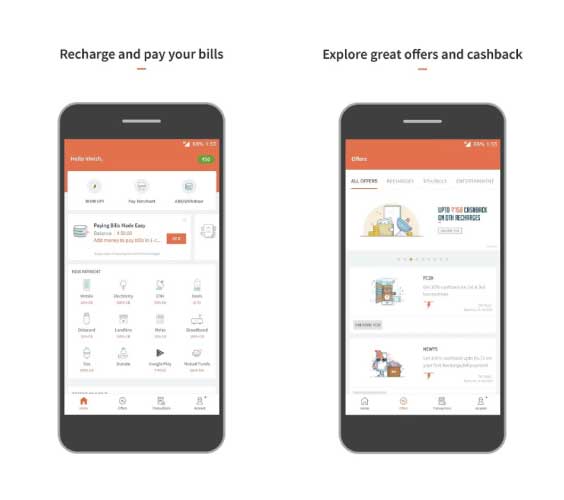
Freecharge is a well-known marketplace for financial services and several other services like mobile wallet, recharges, shopping etc. The app looks forward to providing seamless transactions between different banks.

Several discounts and cashbacks can be gained through successful Freecharge transactions as well as from recharges, shopping, booking etc.

The app also supports UPI payment system which helps in instant transfer of money between two bank accounts.

Main Features:


UPI Payments.


Mobile Recharges.


Bill Payments.


Cashbacks and Discounts.

DownloadFreecharge
5. MobiKwik

Similar to many other E-Wallets, MobiKwik is a smartphone-based payment system as well as a digital wallet. It supports all types of mobile payments, electricity bill payments, online and offline shopping, recharges, ticket bookings etc.

MobiKwik gives you instant cashbacks on online and offline purchases from their preferred stores, recharges and other payments done through the app. Users can also enjoy other benefits such as promo codes, discounts etc on successful transactions.


Main Features:


Mobile Recharge & Bill Payment.


DTH & Data Card Recharge.


Pay Utility Bills: Electricity, Gas, and Water.


Redeem your PAYBACK points on the Mobikwik App.

DownloadMobiKwik

So, these were our picks for the top 5 cashback apps for your Android device. If you liked this post then do not forget to share it with your friends.

Sponsor ads:

Gihosoft Free iPhone Data Recovery:https://www.gihosoft.com/iphone-data-recovery-free.html

Gihosoft iPhone Data Recovery Free

Free iPhone Data Recovery Software for Windows/Mac

Recover up to 12+ types of files, including contacts, SMS, photos, WhatsApp, Viber, notes, etc.

Restore lost data from iOS devices directly or from iTunes and iCloud backup

Recover iPhone data lost due to iOS upgrade/jailbreak, accidental deletion, device lost or broken

Support all the latest iPhone, iPad and iPod Touch

Both Free and Pro version.

If you lost data after you updated to a new iPhone, you can always use Gihosoft iPhone Data Recovery to get the data back from the old iPhone or backup.You may also like: iphonerecovery.com

If you use android phones, please choose Gihosoft Android Data Recovery.

With Gihosoft Android Data Recovery, no longer afraid of data loss!

Must read:Youtube video downloader for pc

Gihosoft RePicvid Free Photo Recovery Software provides a free photo recovery software for windows to help users recover the deleted or lost photo for free.

Jihosoft Android Data Recovery: the best Android Data Recovery software for Windows and Mac to recover deleted contacts, messages, photos, videos, WhatsApp and etc from Android devices.Tips:How to transfer messages from iPhone to iPhone

jihosoft Free iPhone Data Recovery
Also Read:How to Fix AC3 Audio Format Not Supported Error in MX Player
Also Read:How to Add Background Music to Video Online for Free
Also Read:10 Best Free Audiobook Apps for Your iPhone or iPad in 2019
Also Read:How to take a screenshot on any Android phone
Also Read:Top 7 Best Free DVD Burner for Mac You Should Know | 2019 Edition


Also Read:How to Download Twitch Videos for Free

Tuesday, 26 February 2019

How to Transfer Music from iPhone to Android without Computer 2019


How to Transfer Music from iPhone to Android without Computer
1 Transfer Music from iPhone to Android with SHAREit app

The SHAREit app is an app that enables you to send photos, music, and videos between your iOS devices and your android devices without internet, cellular data or Wi-Fi network. To transfer music from your iPhone to your Android without the use of the computer, using the SHAREit app follow the step listed below:

Step 1. Open the transfer app on your android phone, and touch the “Receive” button from its home screen to enable the receiving mode. This will automatically create a Wi-Fi hotspot on your phone.

Step 2. Connect your iPhone to the Android phone’s hotspot by going to “settings”, then to ‘Wi-Fi”. Find the hotspot network and join it.

Step 3. Select the music you want to send and then click on the “send” button.
3 Transfer Music from iPhone to Android with Bluetooth

Transferring music using Bluetooth is an old and effective way of transferring music between mobile phones. Sending music from an iPhone to an android may be a big problem a times, especially when it comes to pairing the two devices. To send music from your iPhone to your Android, you should


Step 1. Enable the Bluetooth features on both mobile devices, by going to “settings” on both phones.

Step 2. On your iPhone, turn on the “Bluetooth” button to search for any nearby Bluetooth-enabled phone.


Step 3. From the list displayed, find the Android Bluetooth name and connect to it.

Step 4. After you might have successfully paired the two devices, go to your music on your iPhone and send the particular music you want to send to your Android phone.
You may also like:

Sponsor ads:

Gihosoft Free iPhone Data Recovery:https://www.gihosoft.com/iphone-data-recovery-free.html

Gihosoft iPhone Data Recovery Free

Free iPhone Data Recovery Software for Windows/Mac

Recover up to 12+ types of files, including contacts, SMS, photos, WhatsApp, Viber, notes, etc.

Restore lost data from iOS devices directly or from iTunes and iCloud backup

Recover iPhone data lost due to iOS upgrade/jailbreak, accidental deletion, device lost or broken

Support all the latest iPhone, iPad and iPod Touch

Both Free and Pro version.
If you lost data after you updated to a new iPhone, you can always use Gihosoft iPhone Data Recovery to get the data back from the old iPhone or backup.You may also like: iphonerecovery.com

If you use android phones, please choose Gihosoft Android Data Recovery.

With Gihosoft Android Data Recovery, no longer afraid of data loss!

Must read:Youtube video downloader for pc

Gihosoft RePicvid Free Photo Recovery Software provides a free photo recovery software for windows to help users recover the deleted or lost photo for free.

Jihosoft Android Data Recovery: the best Android Data Recovery software for Windows and Mac to recover deleted contacts, messages, photos, videos, WhatsApp and etc from Android devices.Tips:How to transfer messages from iPhone to iPhone
jihosoft Free iPhone Data Recovery

Friday, 22 February 2019

How to Delete iPhone Messages – Recoverable!


How to Delete iPhone Messages – Recoverable!

Apart from the method mentioned above to remove iPhone messages, there are three other ways in which you can easily erase your iPhone data.
1 Sync your iPhone with iTunes or iCloud

Syncing your data with iTunes or iCloud will allow you to delete messages from iPhone as you will have a back-up stored on iTunes or iCloud. This will make sure that even after you delete your messages from iPhone, you still have them on iTunes or iCloud.
1. How to sync iPhone with iTunes?

Step 1. Launch iTunes and connect your iPhone to the computer.

Step 2. Right at the top on the upper-right corner, you will see the name of your device being displayed. Select your device.

Step 3. You will now be redirected to another page where you can see the option to back-up your device. Click on “Back Up Now” to create a backup of your iPhone messages.

Step 4. Click “Done”.


2. How to back up using iCloud?

Backing up your iPhone data on iCloud is very simple. All you need to do is go to the Settings app on your phone and then scroll down until you see the ‘iCloud Backup’ option. Enable the option and all your data including your messages will be backed up.

You can then delete your messages from your phone’s memory.


2 Erase all data using the Factory Restore settings.

If you are planning to sell your phone, it is highly recommended that you use the Factory Restore option to wipe your iPhone completely. This will ensure that the potential buyer has no access to your private files.

Also, if your phone is running slow and you feel that there is too much data on your memory, restoring your device to factory settings will likely improve the performance of your device.

In order to factory reset your iPhone, you will need to:

Step 1. Go to Settings -> General -> Reset.

Step 2. Choose the option “Erase All Content and Settings”.

Step 3. Enter your passcode and tap to confirm.


3 Remove the Messages App from Spotlight search

Lastly, if you do not feel that the methods above are effective in your case, you can simply delete the Messages app altogether.

You can do so using Spotlight search.

Step 1. Simply drag down anywhere on your Home Screen until a search bar comes up.

Step 2. Type in ‘Messages’.

Step 3. The app will show up and all you need to do is tap and hold the icon and then tap on the ‘x’ icon to delete it.Sponsor ads:

send anonymous text message from computer for free

Must Read:If you lost data after you updated to a new iPhone, you can always use Gihosoft iPhone Data Recovery to get the data back from the old iPhone or backup.

Gihosoft Free iPhone Data Recovery:iphonerecovery.com

If you use android phones, please choose Gihosoft Android Data Recovery


Although this will prevent you from using the app, you can however, rest assured that your privacy will be protected.

Wednesday, 30 January 2019

Top 11 Free Android Antivirus Apps To Keep Your Device Secured in 2019


As smartphones have become an inherent part of our lives, people no longer use their phones just for communication. Instead, they store most of their sensitive information on their phones. But, in this era of data leaks and constant threats to your privacy, is it safe to store your private data on your phone? Well, not unless it is secured with proper protection.

Also Read: 10 Best Free Security Apps for Android Virus Protection

So, we have picked a list of the best free Android antivirus apps which are available in the Google Play store. You’re advised to go through our list of best antivirus software if you’re a desktop user (Windows or Mac).

Note: This list isn’t in order of preference, and is only a compilation. You are advised to choose one as per your need.
11 Best Android Antivirus Apps for 2019
1. Kaspersky Mobile Antivirus


Kaspersky is a remarkable security app and one of the best antivirus apps for Android. It has a free version with in-app premium feature purchases and a paid version. The free version features manually scanning of apps for malware and viruses, and its premium features include real-time protection, anti-theft, anti-phishing, and an app locker to provide extra protection to your essential apps. However, you can access all the premium features for a free trial for 30 days.
Special Features Of Kaspersky Mobile Antivirus


Call filter for blocking unwanted and spam calls


Find my phone for locating your phone if lost


Background apps check for checking malware in downloaded apps


Strong protection against viruses, trojans, and malware

Download Kaspersky Mobile Antivirus
2. Avast Mobile Security


Avast protects a lot of users worldwide on multiple platforms. With a single tap, the antivirus engine scans for any dangerous or infected apps and trojans, and provides complete protection against spyware and viruses. It has some in-app purchases with which you can remove ads and access the app locking facility, along with some other advanced features like SIM security, camera trap, etc.
7 Best Mobile Phone Unlocking Software to Unlock Your Phone for Free


However, the free version itself integrates some incredible features for providing all-around protection against viruses and other threats that can affect your smartphone. With all these fantastic features, Avast Mobile security is a worthy contender for best free antivirus for Android.
Special Features Of Avast Mobile Security


App insights for viewing the time you are spending on each app


Junk cleaner for wiping cache and residual files


Photo vault for securing photographs against unwanted access


Web shield for safe web browsing

Download Avast Mobile Security
3. Bitdefender Antivirus Free


Bitdefender Antivirus Free is powerful antivirus tool that offers protection against all major Android threats. It is one of the most lightweight antivirus apps that uses in-the-cloud scanning technology that results in super-fast scanning ability. It does not slow down your device or drain your battery. The app also offers real-time protection and scan apps as they are installed.

Bitdefender also has a paid version (Bitdefender Mobile Security & Antivirus), which gives you 14 days of free trial. To access more advanced features of Bitdefender such as Malware scanner, account privacy, web security, Anti-theft, and App locker, you can try out the paid version.
Special Features Of Bitdefender Antivirus


Integrated VPN for accessing blocked websites


Smart unlock for unlocking apps when connected to a trusted Wi-fi.


Web protection for scanning adware, malware during browsing


Support for Android Wear devices

Download Bitdefender Antivirus Free
4. Norton Security & Antivirus


The latest version of Norton antivirus software offers impressive Android security features even in the free version. The app mostly provides 100% detection rate and removes malware, spyware, or Android viruses that can slow down your device. It can trigger an alarm to find your missing device, remotely lock your device to prevent data theft, or block unwanted calls or SMS.

It also has separate stand-alone apps such as app locker and password manager which are available for free in the Play Store. The advanced premium features are available for a trial period of 30 days. Overall, Norton Security is no doubt one of the most reliable and best antivirus for android in 2019.
Special Features Of Norton Security and Antivirus


Wi-fi scanning to notify you about unsecured wi-fi connections


Safe Search for flagging unsafe websites during browsing


Call blocking for muting spam and unwanted calls


Sneak Peek to click photographs of someone accessing your device without authority

Download Norton Security and Antivirus
5. Sophos Mobile Security


Sophos is the 2016 winner of the AV-TEST awards, an Independent IT Security Institute. It is an excellent free security app for Android which does not display any ads and is feature rich. In addition to proper malware protection, you can have access to loss and theft protection, app locker, security adviser that gives you advice on how to improve device security, call blocker, authenticator, etc.
Top 8 Sites to Receive SMS Online for Free via Temporary Phone Numbers


The antivirus app has more than 1 million downloads on the Play Store and does the job of protection against malware, viruses and trojans that could hamper the performance of your smartphone.
Special Features Of Sophos


Web filtering for blocking malicious websites


Feature to protect apps with a passcode


Wi-fi security to protect you from snooping by middlemen


Call protection for blocking spam calls

Download Sophos Mobile Security
6. Security Master


Security Master is the upgraded version of the original CM Security app for Android. It is an all-in-one antivirus app tu use in 2019 that has a considerable number of downloads along with good ratings in the Play Store. It keeps your phone safe from all sorts of malware and makes sure that no viruses get into your phone. The free version itself brings you tons of great security features such as app locker, scanner, message security, Wi-Fi security, junk cleaner, notification cleaner, phone booster, CPU cooler, battery saver, call blocker, etc.

Along with these, it also enables you to browse any of your favorite sites such as Facebook, Twitter, YouTube, etc. safely from within the app. Security Master is an excellent security app that can be listed among best free android antivirus apps.
Special Features Of Security Master


Safeconnect VPN for accessing websites that are blocked in your region


Anti-theft alarm


Message security for hiding notification previews


Intruder selfie for capturing intruders

Download Mobile Security Master
7. McAfee Mobile Security & Lock


McAfee has won many notable awards since its release. Most of the advanced features such as anti-theft features, security lock, Wi-Fi security, battery optimizer, memory cleaner, etc. are available in the free version of the Android antivirus app. It has an intuitive interface, and the best thing is that it provides tutorials for every feature. The pro version, however, comes down to only a few extra features, and it is expensive compared to most Antivirus apps.

One of the flaws in the app is that it carries a complicated setup once you opt for the pro version. Nevertheless, the app is one of the best antivirus apps for Android when it comes to protecting your smartphone.
Special Features Of McAfee Mobile Security


Thief cam for capturing the photographs of intruders


Feature to remotely wipe data in case of theft or loss of mobile phone


Anti-theft uninstall protection to stop a thief from uninstalling the antivirus app


Support for Android Wear devices

Download McAfee Mobile Security
8. DFNDR Security


DFNDR is one such free antivirus for Android that keeps your smartphone’s performance optimized. The AV-TEST Institute named it a top-rated antivirus app. It is an all-in-one phone protection app along with features for anti-hacking and anti-phishing. It can also speed up your internet connection by closing background apps that compete for bandwidth. However, the downside is that it displays ads which can be annoying, but you can go ad-free with a small amount of yearly subscription.
Special Features Of DFNDR Security


Anti-hacking and anti-phishing protection feature


Quick cleanup to remove junk files and cache


AppLock to lock apps with passcode and fingerprint technology


DFNDR assistant for sending you regular updates about utilizing antivirus to its full extent

Download DFNDR Security
9. Avira Antivirus Security


Avira Antivirus is a lesser-known Android security app which is equally reliable like its other competitors on the list. It is fully-featured, and most of its functions are available in the free version itself. In case of antivirus and privacy protection, it can even scan external storage units and show how each app rates on a privacy scale. With the ‘cell phone tracker,’ it can track your phone’s location whenever necessary.

Also, if you ever lose your phone, it can prompt the person who has your phone to contact you. With the premium version, you can get extra protection such as camera protection, additional browser security, etc. These features can be easily bought from the in-app purchases of the app.
Special Features Of Avira Antivirus Security


Privacy advisor for showing how apps collect your data


Camera and Mic protection for security against snooping attacks


Ant-ransomware for protection from ransomware attacks


Web-based malware protection

Download Avira Antivirus Security
10. AVG AntiVirus


AVG AntiVirus is a robust antivirus software tool, developed by AVG Technologies which is a subsidiary of Avast software. It features most of the standard functions necessary in modern anti-virus and internet security programs such as periodic scans, Wi-Fi security, junk cleaner, ram booster, call blocker, power saver, etc.

Some highly useful features are only available for a trial period of 14 days in the antivirus app. AVG also has a few add-on apps such as AVG Cleaner, AVG secure VPN, Alarm Clock Xtreme, and Gallery app available in the Play Store for free.
Special Features Of AVG AntiVirus


Dual-engine antivirus for removing viruses and other malicious content


Performance-boosting feature for extending battery life


Photo vault for locking photographs


Surveillance agent for remotely capturing photos and record audio from phone via the website

Download AVG AntiVirus
11. 360 Security

360 Security is another best antivirus for Android. This app gives you many reasons for why it should be a must-have app on your phone. Major features include antivirus protection, junk cleaner, speed booster, lock screen which has multiple functions, CPU cooler, anti-theft protection, etc.

Tip: Virus Removal for Android : How to Remove Virus from Android Phone

In addition to real-time protection, it has a multi-function lock screen for providing you phone status direct from your smartphone’s lock screen The antivirus app is free with in-app purchases and displays ads.
Special Features Of 360 Security


Speed booster for cleaning up phone’s RAM and boosting gaming experience


Call & SMS filter


Intruder selfie for capturing the picture of anyone trying to break into your phone

Download 360 Security

Did you find this list of 11 Best Android antivirus apps to be helpful? Share your reviews in the comments.

Lost data due to virus attack? Try our free Android data recovery software to recover them.


Tuesday, 15 January 2019

How to Recover WeChat Contacts from iTunes Backup


Recover WeChat Contacts from iTunes Backup

If on the other hand you have a backup of your WeChat data on iTunes, the best way to get it back is to restore the iPhone in iTunes. Here’s how to do it:

Step 1: Launch iTunes on your computer and connect the iPhone to the device using USB cables.

Step 2: Select the iPhone when it appears in iTunes and then click on “Restore Backup”.

Step 3: Select the most relevant backup and then click “Restore”. Wait for the process to finish. You may be required to enter your password if the backup you selected was encrypted.


Note

But this approach has its disadvantages. The following are just some of them:


First, for this solution to be successful, you must have an iTunes backup. You must also be sure that the iTunes backup file contains the missing WeChat contacts.


By restoring the iTunes backup, the existing data on the device will be be permanently erased. In other words, if there are photos, contacts, messages and other data on the device that is not included in any of the backup, they will be permanently erased and can’t be recovered.


You are also unable to see the contents of the backup file which means it is possible to choose a wrong backup to restore.


Sponsor ads:


Gihosoft Free iPhone Data Recovery:https://www.gihosoft.com/iphone-data-recovery-free.html


Gihosoft iPhone Data Recovery Free


Free iPhone Data Recovery Software for Windows/Mac


Recover up to 12+ types of files, including contacts, SMS, photos, WhatsApp, Viber, notes, etc.


Restore lost data from iOS devices directly or from iTunes and iCloud backup


Recover iPhone data lost due to iOS upgrade/jailbreak, accidental deletion, device lost or broken


Support all the latest iPhone, iPad and iPod Touch


Both Free and Pro version.


If you lost data after you updated to a new iPhone, you can always use Gihosoft iPhone Data Recovery to get the data back from the old iPhone or backup.You may also like: iphonerecovery.com


If you use android phones, please choose Gihosoft Android Data Recovery.


With Gihosoft Android Data Recovery, no longer afraid of data loss!


Must read:Youtube video downloader for pc


Gihosoft RePicvid Free Photo Recovery Software provides a free photo recovery software for windows to help users recover the deleted or lost photo for free.


Jihosoft Android Data Recovery: the best Android Data Recovery software for Windows and Mac to recover deleted contacts, messages, photos, videos, WhatsApp and etc from Android devices.Tips:How to transfer messages from iPhone to iPhone


jihosoft Free iPhone Data Recovery

Thursday, 29 November 2018

5 Best Photo Frame Apps For Android 2018-2019


Clicking photographs are not just a fun past-time to do. But indeed it is a great way to restore memories and to relive those beautiful moments. And what better way to make a memory more enhanced than by adding a stunning frame to it. Frames are simply decorative edging for a picture which makes it easier to display or protect it. Almost everyone would have a photo frame hung up on their walls or just beside their desk.

But today in this selfie-holic era it is practically impossible to hang up each one of your photos on your walls. The only thing possible is to give a mesmerizing frame to your photos digitally with the help of your smartphones. And for this, there are many photo frames app which will serve you for this purpose. So saving your time, check out this 5 Best Photo Frame Apps For Android. These apps will surely load you with various frame options suiting for every occasion.


Worth Reading: How to Hide Private Photos on Any Android Phone

5 Best Photo Frames Apps For Android:


Photo Frames Unlimited


Photo Frames by Studio apps


Photo Frame by High secure


Waterfall Photo Frames


Love Photo Frames HD
1. Photo Frames Unlimited

Photo Frames Unlimited as the name suggests gives you a ton of options to select from to decorate your photo. The app has around 20 frame categories that will make your every photo moments unforgettable. It also has photo filters and effects feature that will enhance your photo even better. So frame your masterpiece and give it a professional look with Photo Frames Unlimited.


Main Features:


PIP style.


More than 650 frames, 150+ HD hoardings, and around 50 shapes.


Set your masterpiece as an HD wallpaper.

Accidentally lost or deleted some important photos from your Android phone? Learn how to recover deleted photos from Android with Gihosoft Free Android Data Recovery Software.

DOWNLOAD THIS APP
2. Photo Frames by Studio apps

Decorate your pictures with high-quality frames that will make you feel, your photos are on a hoarding. Feel like a celebrity with this Photo Frames app. Enhance your photos with beautiful effects and texts. No internet connection required so just get started.


Also Read: Best Android Photo Recovery Apps and Software without Root


Main Features:


Pleasant User Interface.


Save to SD card.


Rotate your image and zoom in or zoom out by finger touch.

DOWNLOAD THIS APP
3. Photo Frame by High Secure

Add beautiful frames to your photos with this stunning photo frame app. Not only photo frames but create a beautiful collage out of your favorite pictures. It has a simple user interface so that everybody can use it, no need to be a professional.


Main Features:


Multiple frame flower for use choose.


Pick the layout you like best.


Create a professional Photo Frame instantly.

DOWNLOAD THIS APP
4. Waterfall Photo Frames

Entre into the beauty of the water world. And decorate your photos with mesmerizing frames with the Waterfall Photo Frames app. Make your photos appear in a beautiful waterfall and give a peaceful touch to your soul. Add text to your image or simply keep it as it is and gets started with Waterfall Photo Frames.


Main Features:


You have a vast collection of frames to adorn your waterfall photos with Waterfall Photo Frame app.


Add text to the frame, Can change the size, color, and font of the text at any time.


Give different effects to your photos with more than 30 Waterfall Photo Frames app.
How to Save Instagram Photos and Videos on Android Phones


DOWNLOAD THIS APP
5. Love Photo Frames HD

Add love themed frames to your images with Love Photo Frames HD. Add texts or love stickers that will enhance your images and make it more beautiful. Additionally, you can also send love quotes through the app to all your near and dear one.


Main Features:


Add text and colors.


Love quotes.


Save, send and share in online platforms.

DOWNLOAD THIS APP
Related Posts:

Top 10 Best Free Android Photo Editors in 2018

9 Best 360 Degree Camera Apps for Android


Wednesday, 5 September 2018

WhatsApp 2.18.90 brings photos in notifications, suspicious links notifications


WhatsApp 2.18.90 brings photos in notifications, suspicious links notifications
WHAT’S NEW IN WHATSAPP 2.18.90?

1. PHOTOS IN NOTIFICATIONS

The most important improvement of the WhatsApp update is that you can view received media, such as photos and GIF images, straight from the notifications. Normally you always see the message “Photo” inside notifications.

However, from now on, you can preview photos and GIFs directly from the notifications, without opening WhatsApp every time.

It goes like this – If a friend or family member sends you a photo, you can swipe down the notification on your iPhone to view the picture immediately.

An alternative is to use 3D Touch, which works on iPhone 6s and newer – to check the photo in advance.

The feature is being rolled out slowly to every WhatsApp user and only works if your Apple device runs iOS 10 or above firmware.
2. SUSPICIOUS LINKS NOTIFICATION

WhatsApp has been working on a feature that automatically recognizes suspicious links. This feature is now available and alerts you when you get a suspicious web page that is probably not what it seems.


Here’s what a suspicious link looks like –

https://ẉhatsapp.com/free-tickets

The app looks for special characters in the URL, such as “ẉ” instead of a normal “w” as shown above. If that is the case, you will receive a red “SUSPICIOUS LINK” notification in the conversation.

Hackers often use these kinds of subtle differences in signs to send you to an insecure website.
3. WALLET APP SUPPORT

If you use the Wallet app on your iPhone to store; for instance, loyalty cards, payment cards, and flight tickets – you can now also share your cards via WhatsApp.

This is useful, for example, if you have stored cinema tickets in the Wallet app, and you want to send them to your friends.
4. SEARCH IN STATUS UPDATES

Finally, there is a new function that we doubt is useful for many people. Everyone with many friends who regularly use the status function will be happy with the new search function.

It is now available in the status tab. To make the search field appear, you just need to drag the window a bit down.

The status function has also become quite controversial since recently because WhatsApp wants to start showing ads in this tab.
DOWNLOAD WHATSAPP V2.18.90

WhatsApp is gradually rolling out version 2.18.90 rolls out via App Store. You can get the update using the download link given below.


DownloadQR-Code

WhatsApp Messenger

Developer: WhatsApp Inc.

Price: FreeIf you are yet to receive this update, it will probably pop up on your device in a few hours from now.

Besides, the update also includes support for the iPhone 4, a device that was released back in 2010.

Gihosoft Android data recovery Free is a super awesome software specialized in Android file recovery. With this program, you are able to recover deleted photos, music, videos, messages, contacts, call logs, WhatsApp messages, Viber chat history and more from Samsung, Huawei, LG, HTC, Motorola, Google, Oneplus, Sony, Lenovo, ZTE and other Android devices directly. Meanwhile, this Android data recovery software is available for both Windows and Mac platforms.For now, check:Free iTunes/iPhone Backup Extractor for iPhone, iPad

Jihosoft iTunes Backup Extractor free is a powerful tool to recover and extract important data from iPhone, iPad & iPod touch backup on Windows or Mac.

If you can’t sync with iTunes and want to rescue data from a disable iPhone, you could try Gihosoft iPhone Data Recovery. Also feel free to ask questions on the iDevice is disabled error in the comments section below.